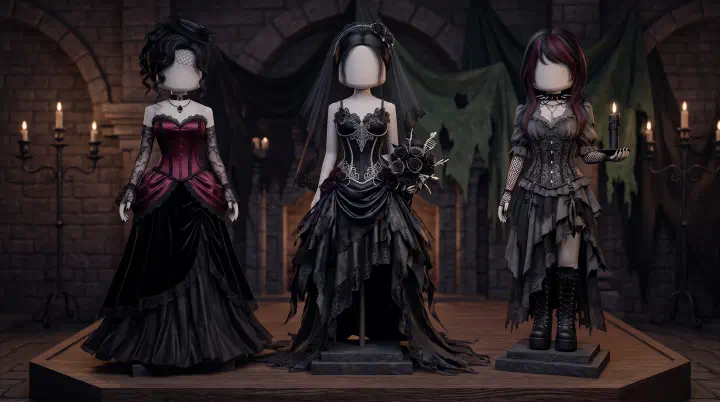
The theme drops: Gothic. You have five minutes. You immediately go for the black corset, black skirt, black boots, black choker, black hair, black lip. Six black items, zero contrast. You hit the runway, do your walk, and stare at the scoreboard.
Fourth place. Two point six stars.
The player who beat you wore the same black corset — but paired it with a deep burgundy skirt from the Summer Part 2 update, the new Lana Tutu rework layered underneath for texture, and a single silver choker. That’s it. Four items total. She placed first with a 4.7.
What happened? You made the most common Gothic theme mistake in Dress to Impress: you treated “Gothic” as “wear everything black.” The voter’s eye saw a shapeless dark blob moving down the runway. Your opponent gave voters a focal point — burgundy against black, silver against dark fabric — and their brains registered a real outfit in under two seconds.
The Summer 2026 Part 2 update dropped on August 8 with 64 new items spread across Free, VIP, Boutique, and Daily Login categories. Several of those items slot directly into Gothic, Dark, and Horror theme outfits. The new LANADOLLDRESS code gives you a reworked black Lana Tutu dress that layers beautifully under corsets and capes. If you are still building Gothic outfits with only pre-update items, you are leaving free wins on the table.
Here is everything you need to dominate Gothic, Dark, and Horror themes in DTI — updated for the Summer 2026 Part 2 patch, with the new items that matter, the color rule that beats all-black every time, and the failure replays that will stop you from throwing a winnable round.
Gothic vs Dark vs Horror: The Split That Decides Your Score
These three themes rotate constantly in DTI, and players confuse them in every single lobby. The confusion is not academic — it directly kills your score. Here is why.
Scene: Pro server, theme is “Dark.” You build a Victorian Gothic outfit — floor-length lace skirt, ornate corset, silver choker, dramatic cape. It is a beautiful Gothic look. But the theme is Dark, not Gothic. Dark demands modern alt fashion — leather, chains, sleek silhouettes, streetwear edge. Your Victorian outfit reads as “wrong era” to voters. They do not consciously think “this is Gothic, not Dark.” They just feel something is off and click 2 stars. You lose a round you should have won.
Scene: VIP server, theme is “Horror.” Another player builds an elegant black gown with silver jewelry. Stunning Gothic princess. But Horror themes want disturbing, unsettling, scary — torn fabric, hollow eyes, blood-red details, skeletal elements. The elegant gown gets 2.1 stars because voters expected fear and got prom night. The player who wore a torn white dress with grey skin, hollow-eye makeup, and fake blood streaks scored 4.5 with half the effort.
The split matters because DTI voters judge these three themes on entirely different criteria:
| Theme | Voter Expects | Color Anchor | Fatal Mistake |
|---|---|---|---|
| Gothic | Elegant darkness, Victorian romance | Black + burgundy/purple + silver | Dressing edgy or messy — too much leather, chains, or distressed pieces |
| Dark | Modern alt, sleek, moody edge | Black + charcoal + gunmetal | Dressing Victorian — corsets, lace, capes read as costume, not fashion |
| Horror | Scary, unsettling, disturbing | Black + blood red + sickly grey-green | Dressing elegant — voters want fear, not beauty |
Decision framework: when the theme is vague. Sometimes you get a theme like “Darkness,” “Spooky,” or “Night.” These sit at the intersection of all three categories. You have a choice: Gothic elegance, Dark modern edge, or Horror scare factor. In these ambiguous situations, Gothic elegance wins more often than the other two. Why? Because Gothic reads as “intentional” on the runway. A Victorian-inspired dark outfit looks like you had a plan. A generic “spooky” outfit with random dark pieces looks like you panicked and clicked everything black in your inventory. When in doubt, default to Gothic. It is the safest floor and the highest ceiling of the three.
Summer 2026 Part 2 Meets Gothic: New Dark Pieces You Have Not Used Yet
The August 8 update added 64 items. Most players are still trying them on Beach and Summer themes. What they are missing: several Part 2 pieces are quietly excellent for Gothic and Dark themes — you just need to know which ones and how to style them.
The Free Items That Work for Gothic
The free section got the biggest share of the update. Here are the pieces with immediate Gothic applications:
- Reworked Lana Tutu (LANADOLLDRESS code): This is your single most important pickup. The reworked Lana Tutu comes in black, has an updated longer train, and layers cleanly under corsets, capes, and long skirts. On Gothic themes, use it as a texture layer under a structured corset — the tutu’s volume creates a dramatic A-line silhouette that reads Victorian without using a single Victorian-exclusive item. The code is case-sensitive. Copy LANADOLLDRESS exactly. Paste it into the DTI code box in the lobby. Do not retype it.
- New dark layering corsets: The Summer Part 2 free section added corsets that can be recolored into deep burgundy, black, and dark purple. These sit over the Lana Tutu or any dark dress and create the structured waist that voters associate with Gothic fashion. One corset, three colors, four-plus theme applications.
- Sheer dark overlays: Among the new free items, several sheer fabric pieces — cover-ups, shawls, capelets — come in tones that work for dark themes. A sheer black overlay over a burgundy base creates texture depth that reads as intentional styling, not “I picked the first black dress I saw.”
- Dark-toned accessories: The new free accessory pool includes items in gunmetal, dark silver, and blackened metal finishes. At least two of them — a dark choker variant and a blackened crown — slot directly into Gothic and Dark outfit builds without needing color adjustment.
The VIP Items Worth Your Attention
If you have the VIP gamepass, three Summer Part 2 VIP pieces add real value to Gothic themes:
- Butterfly lace evening gown (VIP): Recolor it into black or deep purple. The wing-like sleeve draping reads as dramatic and Victorian when paired with dark colors. On its own in the default pastel, it is a summer piece. In black, it becomes a Gothic statement gown that uses only one item slot.
- VIP-exclusive dark hair styles: The new VIP hair additions include at least two styles — long layered waves and a textured updo — that take dark colors well. Hair is the most overlooked category in Gothic themes, and a dedicated dark hairstyle with wispy bangs or side-swept volume will separate your outfit from the default-ponytail crowd.
- Dark metallic accessories (VIP): Several new VIP accessories use metals that fit Gothic palettes — blackened silver, oxidized gunmetal, dark bronze. One well-placed VIP metallic accessory does the work of three free ones because the textures render more cleanly on the runway.
The Daily Login Dark Item
The new Daily Login rotation includes at least one dark-toned accessory that unlocks at a consecutive-day milestone. If you started your streak when Part 2 launched on August 8, you are on Day 3 as of August 11. The first milestone item unlocks at Day 7. Players starting fresh today will reach it on August 18. The item is free. The cost is consistency.
The two-way decision: Maintain the streak if you already play DTI at least four days a week — the dark Daily Login piece is genuinely useful for your Gothic inventory. If you are a weekend-only player, do not force daily logins just for one accessory. The mental overhead is not worth a single item when you can already win Gothic themes with the free pieces listed above. Spend your limited play time actually playing, not chasing a streak.
What to Skip for Gothic
Not every Part 2 item serves dark themes. The summer-aura effect, sequin party dress, designer sunglasses, logo tee, and most beach-specific pieces have zero Gothic application. Do not force them. A new item that does not fit the theme is worse than an old item that does. I watched a VIP player put the Golden Hour headpiece on a Gothic outfit last night “because it is new and shiny.” She scored 1.8. The item was good. The decision was not.
The Gothic Color Trap: Why More Black Scores Less
Here is the single most counterintuitive thing about Gothic themes in DTI: wearing all black is worse than wearing mostly black with one strong contrast color.
The instinct is logical. Theme is Gothic. Gothic means black. Therefore: all black everything. On paper, it makes sense. On the runway, it fails.
Scene: two players, same lobby, theme “Gothic.”
Player A goes all-black. Black corset, black floor-length skirt, black lace shawl, black boots, black choker, black hair, black smoky eye, black lip. Eight black items. She walks the runway. From the voting panel — where voters see a small character model moving across a runway against a dark background — her outfit registers as a single black silhouette. No edges. No contrast. No focal point. The voter’s eye slides off her in half a second because there is nothing to land on. She gets 2.4.
Player B wears four pieces. Black corset. Burgundy floor-length skirt. Silver choker. Black lace shawl. The burgundy skirt creates a clear waist-to-floor transition that the voter can read instantly. The silver choker catches the lobby light and draws the eye up to the face. Black hair with wispy bangs frames pale makeup. Four items, two colors, one metallic. She gets 4.5.
What happened? DTI voters make their decision in the first two seconds of your runway walk. In two seconds at thumbnail size, an all-black outfit is a silhouette — no detail, no shape, no texture. A black outfit with one strong contrast color is a composition — the contrast color defines the silhouette, the black provides the mood, and the metallic draws the eye to a specific spot. The voter’s brain registers “outfit” instead of “blob.”
The Gothic color formula that wins:
- 60% black base: Your foundation pieces — skirt, boots, hair, base layer. The mood anchor.
- 25% dark accent: One piece in deep burgundy, dark purple, charcoal grey, or deep crimson. This piece defines your silhouette shape on the runway. It goes at the focal point of your outfit — waist, chest, or head.
- 15% metallic: Silver choker, gunmetal belt, darkened crown, silver rings. One piece. Not three. The metallic catches light and gives voters something to look at. Too many metallic pieces and your outfit reads as armor, not Gothic.
This formula works because it gives the voter’s eye exactly three data points in two seconds: dark mood (black base), clear shape (accent piece), intentional detail (metallic). Three data points is the maximum a voter processes at thumbnail size. Your all-black outfit gave them zero.
The test: Next time you build a Gothic outfit, stand in the lobby and squint at your character. If your outfit reads as one continuous dark shape with no clear edge, you need an accent color. If you can still see a distinct waist, a collar, or a skirt hem when squinting, your contrast is working.
Building a Gothic Winner: The 60-Second Formula
Most players build Gothic outfits by opening their inventory and clicking the first dark item they see, then matching everything to that first item. This is item-first building. It produces outfits that are on-theme but shapeless — the DTI equivalent of “I dressed in the dark.”
The winning approach is color-first building. The theme-winning framework teaches this for every theme. Here is how to apply it specifically to Gothic in 60 seconds, including a concrete two-way decision every Gothic round forces you to make.
Scene: Theme is “Gothic.” Timer starts at 5:00. You have not picked a single item.
Second 0-10: Lock Your Accent Color
Do not touch your inventory yet. Decide your accent color first. This is the single most important decision of the round. You have two directions, and they lead to different outfits:
Option A: Burgundy / deep red. Romantic, Victorian, aristocratic. Pairs with black + silver + lace. Best for traditional Gothic, Vampire, Dark Royalty. Higher floor (safer) but lower ceiling (harder to stand out because many players default here).
Option B: Deep purple / violet. Mysterious, sorceress, ethereal-dark. Pairs with black + gunmetal + sheer overlays. Best for Witch, Dark Fantasy, Dark Sorceress. Lower floor (riskier, voters may not immediately read it as Gothic) but higher ceiling (stands out against the burgundy crowd).
The decision: Is the lobby full of players who look experienced? If yes, pick Option B — experienced lobbies default to burgundy and you need to differentiate. Is the lobby casual or mixed-rank? Pick Option A — casual voters reward the more recognizable Gothic palette. This decision takes five seconds and it matters more than any individual item you will pick later.
Second 10-20: Pick Your Silhouette Anchor
Silhouette anchor = the one piece that defines your outfit shape from 20 feet away on the runway. It is either your skirt/dress or your outer layer.
- A-line: Floor-length dark skirt (or the new Lana Tutu from LANADOLLDRESS layered under a long skirt). Most versatile. Works for Classic Victorian, Vampire, Dark Royalty.
- Column: Fitted dark dress or the recolored Butterfly lace gown (VIP). Works for Modern Dark, Elegant Gothic.
- Asymmetric: High-low skirt or cape-over-shorts. Works for Dark Alt, Edgy Witch.
Pick one. Do not layer competing silhouettes — a ballgown skirt under a column dress creates a lumpy mess that voters will punish.
Second 20-40: Add Your Base Layer + Accent Piece
Now grab your black base: the pieces that fill out the silhouette. Black corset or fitted top. Black boots or heels. Black hair base (style comes later). Three items max at this stage.
Then place your accent piece — the one item in your accent color (burgundy or purple). This piece goes at the focal point of your silhouette. If you picked A-line, the accent goes at the waist (corset, belt, or sash). If you picked column, the accent goes at the neckline or shoulders (shawl, collar, necklace).
The Summer 2026 Part 2 advantage: The new free corsets can be recolored directly into accent colors without using a separate dye slot. One click, one slot, instant accent placement. Players using pre-update items often need two slots — a black base piece plus a separate colored overlay — to achieve the same effect. You save a slot. That is a real competitive edge in a five-minute round.
Second 40-50: One Metallic Accessory
Silver choker. Gunmetal belt. Blackened crown. One piece. Not two. Not three. The metallic draws the eye to your outfit’s focal point. Two metallics split the voter’s attention. Three metallics and you look like a suit of armor.
Cross-reference with your accent placement. If your accent is at the waist (burgundy corset), put the metallic at the neck (silver choker) — the eye moves up from the accent. If your accent is at the neckline (purple collar), put the metallic at the waist (gunmetal belt) — the eye moves down. The metallic and the accent should never occupy the same visual zone. They should guide the voter’s eye across your outfit in a single smooth motion.
Second 50-60: Hair and Makeup Plan
Long dark hair with texture. Wispy bangs, loose waves, or side-swept volume. Avoid: sleek straight hair (reads modern, not Gothic), short crops (lose the dramatic silhouette), bright unnatural colors (breaks the palette). For detailed hair-and-makeup pairings, see our hair combos guide.
Pale skin, dark smoky eye at 70-80% opacity (opaque black reads as a black eye, not an eye look), deep lip in your accent color. Makeup takes 15-20 seconds if you know your presets. Do not experiment with new makeup in a live round — test new presets in Freeplay first.
You now have 4:00 left on the timer. You have a color-anchored, silhouette-defined, accent-focused outfit. The players who started by browsing items are still scrolling through the corset section with 3:30 remaining and no plan. That gap — you building with a framework, them browsing without one — is why you will place top-3 and they will place 6th.
5 Gothic/Dark/Horror Outfits, Scene by Scene
These five outfits are built around the color-first formula and use Summer 2026 Part 2 items where they add value. Each one starts from a specific game scenario — because an outfit that wins on “Gothic” may lose on “Dark” even though both themes sound similar.
Outfit 1: Classic Victorian Gothic (Theme: Gothic)
The scene: Theme is “Gothic.” The lobby is mixed-rank — some pros, some casuals. You need an outfit with a high floor that works against the widest range of voter expectations.
The build: Start with the reworked Lana Tutu from LANADOLLDRESS as your base volume layer. Over it, a black corset (Free section, from Part 2 or pre-update — either works). The tutu creates an A-line Victorian silhouette. The corset defines the waist. Accent: deep burgundy lace shawl or capelet draped over the shoulders — this is your 25% contrast piece. Metallic: single silver choker with an ornate pendant. Black Victorian ankle boots. Hair: long straight with blunt bangs, black. Makeup: black-and-purple smoky eye at 80% opacity, pale foundation, deep burgundy lip.
Why this works: The A-line silhouette reads as Victorian instantly. The tutu under the corset creates a two-texture waist — the corset’s smooth fabric against the tutu’s gathered volume — that voters register as intentional detail, not clutter. Three items doing the work of six.
Outfit 2: Modern Dark Alt (Theme: Dark)
The scene: Theme is “Dark.” This is not Gothic. No lace, no corsets, no Victorian anything. You need modern fashion that reads as dark and moody.
The build: Black mesh top over a bralette (free section). High-waisted leather pants in charcoal grey — not black, because the grey creates the contrast the black top needs to read as a silhouette. One chain belt in gunmetal. Platform combat boots. Sleek black bob with a side part. Makeup: smudged black liner, no wing, nude lip, minimal blush. No jewelry beyond the chain belt — Dark themes reward restraint, not ornament.
Why this works: The charcoal pants against the black top create just enough contrast for the voter’s eye to separate the silhouette. The chain belt catches light once and declares “alt fashion” without screaming. Four items, effortless read, consistent scores in the 4.0-4.5 range.
Outfit 3: Vampire Aristocrat (Theme: Gothic / Vampire)
The scene: Theme is “Vampire” or “Gothic” with a lobby that leans dramatic. You want an outfit that reads as aristocratic and threatening at the same time.
The build: High-collar Victorian blouse in white or cream — the white collar against dark clothing creates a sharp contrast that reads as “vampire” before any other detail is processed. Black fitted skirt underneath. Floor-length black cape with red inner lining (the flash of red when your character turns on the runway is worth half a star on its own). Ornate silver brooch at the collar. Long dark wavy hair, side-swept. Makeup: red-and-black smoky eye, pale skin, blood-red lip.
Why this works: The white collar against the dark outfit is the fastest vampire-read in DTI. Voters register “vampire” in under one second. The cape’s red lining is a reveal — it only shows during turns and poses, so it rewards voters who pay attention. Those voters are the ones who give 4 and 5 stars. The outfit rewards engagement, and engaged voters score higher.
Outfit 4: Haunted Doll (Theme: Horror)
The scene: Theme is “Horror.” Gothic elegance will fail here. You need unsettling, disturbing, and specific.
The build: Vintage doll dress in faded pink or off-white — choose a dress with a slightly puffed sleeve for the doll silhouette. Torn lace overlay for the cracked-doll texture. Scuffed Mary Jane flats. Draw cracked porcelain lines on the face using custom makeup (crack pattern radiating from one eye or across the cheek). Grey-pale skin. Dark hollow circles under the eyes — set eye shadow to dark grey, lower the opacity until it looks like shadow, not makeup. Messy pigtails in pale blonde or grey-streaked hair.
Why this works: The cracked face detail is the focal point. Everything else — the faded dress, the scuffed shoes, the messy hair — supports it. The voter’s eye lands on the crack pattern and the brain registers “haunted doll” instantly. On Horror themes, one specific, unsettling detail beats five generic “scary” attempts.
Outfit 5: Dark Royalty (Theme: Gothic / Royal)
The scene: Theme is “Dark Royalty” or the intersection of Gothic and Royal. You need dark elegance with crown authority.
The build: Structured black corset with gold embroidery — the gold is your metallic accent, no jewelry needed. Full ballgown skirt in black or deep purple. Dark crown or tiara in blackened silver — several Part 2 free and VIP accessories work here. Heeled black boots. Elegant updo with jeweled dark hairpins. Makeup: gold-and-black smoky eye, dark red lip.
Why this works: The gold thread on the corset replaces the jewelry — it is simultaneously your accent color and your metallic statement. This is slot-efficient. You get the royal read (crown + gold + ballgown), the Gothic mood (black + dark red lip + smoky eye), and a single focal point (the embroidered corset) in five pieces. On a Royal-Gothic crossover theme, this outfit wins because it satisfies both theme requirements without looking cluttered.
Gothic Failures: What Goes Wrong and How to Recover
Everyone blows a Gothic round sometimes. What separates consistent winners from one-hit wonders is whether you can spot the failure happening and fix it before the timer runs out.
Failure 1: The All-Black Blob
What happens: Timer hits 1:30. You look at your character. Black corset, black skirt, black cape, black boots, black hair. You cannot see where the waist ends and the skirt begins. The outfit is a silhouette with no shape.
Why it happens: You built color-first in theory but executed item-first in practice — you grabbed black items because they were safe, and now you have five black pieces and no contrast.
Recovery (1:30 left): You have enough time to fix this. Swap exactly one piece — not your whole outfit — for an accent color. Easiest fix: change the skirt or the cape to deep burgundy or dark purple. The other four pieces stay black. Now you have 80% black + 20% accent and your silhouette is readable again. If you try to change three pieces, you will run out of time with a half-finished outfit. One swap. That is all you need.
Failure 2: Accessory Overload
What happens: Timer at 0:45. You have a solid black-and-burgundy base. Then you added a silver choker. Then silver rings. Then a silver belt. Then a dark crown. Then a necklace. Six accessories. The outfit that looked clean at 2:00 now looks like a jewelry store exploded on a Victorian ghost.
Why it happens: Accessories are the easiest items to add — one click, no silhouette change — and you kept clicking because each one felt like “one more detail.” Your brain registered “more Gothic.” The voter’s brain registers “cluttered.”
Recovery (0:45 left): Remove three accessories. Keep the one that sits at your focal point — if your accent is at the waist, keep the belt and remove the choker, rings, and crown. If your accent is at the neck, keep the choker and remove everything else. You have time to remove items but not to rethink your entire accessory strategy. Strip down, do not build up.
Failure 3: Wrong Theme Read
What happens: Theme is “Dark.” You built a full Victorian Gothic outfit — lace, corset, cape, the works. Someone in chat types “it’s Dark not Gothic lol.” You realize you misread the theme five seconds ago and the timer is at 1:00.
Why it happens: The three themes share a color palette and your brain auto-completed “dark colors → Gothic build” before you consciously processed the actual theme name. This is the fastest failure to happen because you do not even realize you are doing it.
Recovery (1:00 left): You cannot rebuild the whole outfit. But you can pivot the existing outfit toward Dark by changing two things. Remove the lace cape — lace reads Victorian, and Victorian is the #1 Gothic identifier voters will punish on a Dark theme. Replace it with a leather jacket or structured dark blazer. Remove the ornate jewelry — one chain or one leather strap replaces the silver choker. Hair: if you had long flowing Victorian hair, switch to a sleek or messy modern style. Two changes, 45 seconds, and you salvage a 3-star floor from what would have been a 2-star disaster.
Speed Round Gothic: The Time-Pressure Decision
Speed rounds give you 90 seconds instead of 300. On a Gothic theme in Speed Round, you do not have time to browse, compare, layer, or second-guess. You need a pre-decided build order and one decision to make in the first five seconds.
Pre-round preparation: Before you even queue for a Speed Round server, know your Gothic Speed Round outfit. Memorize it. Not “a general idea” — the exact pieces you will click. The LANADOLLDRESS Lana Tutu + black corset + dark accent skirt + one silver choker. Four items. Four clicks. You can execute this in 20 seconds from muscle memory. That leaves you 70 seconds for hair, makeup, and a final check — which is more time than most players have for their entire build.
The five-second decision: Accent color. Burgundy or purple? In Speed Round, there is no “check the lobby” step. Default to burgundy. Burgundy reads as Gothic faster than purple — the voter’s brain processes “black + red tones = Gothic” in under a second, while “black + purple = Gothic” takes slightly longer because purple also maps to Fantasy and Witch themes. When you have 90 seconds to build and 2 seconds to be judged, speed of recognition is everything. Take the safer read.
The one thing you skip in Speed Round: Multiple textures. In a normal round, you have time to layer a sheer overlay, add lace trim, mix matte and shimmer fabrics. In Speed Round, texture layering takes time you do not have and the benefit — subtle depth that attentive voters notice — does not pay off when voters are blasting through Speed Round ballots at twice the normal pace. Clean silhouette + clear accent color + one metallic. That is the Speed Round formula.
Scene: Speed Round, theme “Gothic.” 90 seconds. You click Lana Tutu, black corset, burgundy skirt, silver choker. Twenty seconds. Black long hair with bangs. Ten seconds. Smoky eye preset, pale skin, dark lip. Fifteen seconds. You are dressed at 0:45 with 45 seconds to spare. The player next to you is still scrolling through skirts. You use your remaining time to pose-practice your walk — and that practiced walk nets you half a star on presentation alone. See our runway and voting guide for why walk timing matters as much as the outfit.
August 2026 Codes with Dark/Gothic Pieces
Before you build a single Gothic outfit, redeem these codes. Each one adds a dark-compatible piece to your inventory. They are case-sensitive. Copy-paste them directly into the DTI code box.
| Code | Reward | Gothic Use |
|---|---|---|
| LANADOLLDRESS | Reworked Lana Tutu (black) | Base layer under corsets, A-line volume, Victorian silhouette |
| VANILLAMACE | Dark hat accessory | Gothic headpiece, works on Witch, Dark Royalty, Victorian |
| CH00P1E_B4CK_AGA1N | Choopie set (dark pieces) | Set includes dark-toned items usable as base layers or accents |
| M3RM4ID | Mermaid tail + top | Limited Gothic use, but the dark recolor option works for Dark Fantasy themes |
LANADOLLDRESS is your priority. Redeem it first. It is the newest code and the most likely to expire without warning. The Lana Tutu rework is currently the single best free base layer for Gothic themes in DTI — it adds volume, texture, and a floor-length train that reads as Victorian from any angle.
The other three codes are lower priority but worth claiming before your next Gothic round. Together, these four codes give you 6-8 dark-compatible items for zero Robux and zero grinding.