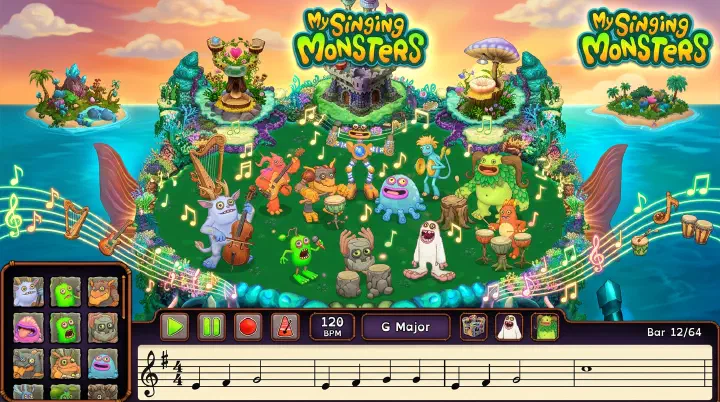
Last updated: July 4, 2026. This guide covers everything about My Singing Monsters Composer Island — the grid-based music creation tool, the note and pitch system, instrument selection, tempo and key signature settings, recording and sharing, and how to recreate famous songs note by note.
The 2 AM Composer Island Meltdown
It’s 2 AM. Your thumbs are cramping. For three hours you’ve been tapping monsters onto a 5x10 grid, recreating “Megalovania” note by painstaking note. Every Cybop synth lead, every Pummel kick drum, every T-Rox power chord — placed exactly where you think it belongs. The room is quiet except for the faint tap-tap-tap of your screen. You hit play, grinning, ready for that iconic riff to blast through your phone.
What comes out sounds like a kitchen drawer of silverware tumbling down stairs. Too slow. Sluggish. Wrong.
You check the settings. Tempo: 80 BPM. The song needs 120. You were so obsessed with getting the notes right that you forgot the speed entirely. Three hours. Gone. And here’s the real kicker — one accidental tap on “new composition” wipes the whole grid. No undo. No save slot. Just dust.
That is Composer Island. Brilliant when you know the rules. Brutal when you don’t.
Introduction to Composer Island
Composer Island isn’t like the others. You don’t collect coins here. You don’t breed monsters. You place monsters on a 5x10 grid, and each monster becomes a single note at a single pitch. It’s a full music studio squeezed into a mobile game.
The island unlocks at Player Level 10 for 25,000 coins — early enough that beginners can experiment, but deep enough that endgame players still mess around with it for hours. It’s a sandbox, a music theory teaching tool, and a social platform all crammed into one tiny grid.
This guide covers the interface, the music theory you actually need, instrument selection, advanced techniques, and the hard lessons most players learn the hard way.
Unlocking and Accessing Composer Island
Composer Island becomes available once you reach Player Level 10. The entry fee is 25,000 coins, which is deliberately cheap. The developers wanted new players experimenting with music right away instead of grinding for weeks. You can access it from the island selection screen via the map icon.
When you first arrive, you will see a completely empty 5x10 grid. Five rows run vertically, representing pitch. Ten columns run horizontally, representing time. A toolbar sits at the bottom with monster selection, tools, and playback controls. A settings panel controls tempo, key signature, and time signature. Monster portraits line the left side, showing which creatures are currently placed. You start with nothing on the board.
The Grid System: Understanding Rows, Columns, and Time
Everything on Composer Island lives inside that 5x10 grid. If you don’t understand how this tiny box maps to actual music, nothing else matters.
Rows control pitch. The bottom row is your bass territory — think low thumps, root notes, and foundational accompaniment. Row 2 handles low-mid harmony and baritone parts. Row 3 is the melodic sweet spot, where most lead lines live. Row 4 covers high-mid harmony and counter-melodies. The top row is treble territory for lead melodies, high accents, and decorative ornaments.
The exact pitch of each row depends on the monster you place there. A Mammott on Row 3 produces a different pitch than a Toe Jammer on Row 3. Same row, different note. This is the first concept that breaks new players: the grid gives you scale degrees, not absolute piano keys.
Columns control time. The grid advances left to right, with the playhead sweeping across each column during playback. Column 1 is the downbeat — the strongest accent in almost any rhythm. Columns progress sequentially through Column 10, which marks the end of the loop. With the default time signature, those 10 columns give you approximately 2.5 measures in 4/4 time, or roughly five seconds of music at 120 BPM.
Placement rules are strict. Each monster occupies exactly one cell. You cannot stretch a monster across multiple columns or stack two creatures in the same cell. To build a chord, you place multiple monsters in the same column but across different rows. To build a melody, you string monsters across different columns, varying the row to change pitch. One monster, one note, one moment in time.
Monster Selection: Your Instrument Palette
The monsters you place are your instruments. Each species produces a unique timbre based on its element, while the row you choose determines its pitch. If you have not unlocked all Natural monsters yet, see our My Singing Monsters Breeding Guide for breeding combinations to fill out your collection.
Melody and Lead Instruments Tweedle brings a bright flute-like wind sound perfect for lead lines and folk melodies. Cybop delivers a sharp synth lead that excels in electronic and chiptune covers. Dandidoo offers a clean whistle that cuts through dense arrangements. T-Rox layers in rock guitar crunch for power riffs. PongPing provides marimba and xylophone tones ideal for playful, rhythmic leads. Fwog adds a funky synth texture that works for both bass and lead roles.
Bass and Low-End Foundation Noggin produces a deep drum thump that anchors percussion sections and doubles as bass. Mammott generates warm bass synth tones — the classic root-note choice. Squot pushes deep sub-bass synth sounds for electronic and ambient pieces. Fwog, again, can drop into the low-mid range for groovy bass lines.
Harmony and Chord Support Quibble contributes a vocal “doo” that blends beautifully in choral stacks. Maw produces an “ah” pad sound perfect for sustained choir textures. Bowgart layers violin and cello string tones for emotional, sustained harmony. Clamble strums a guitar-like timbre for rhythmic chord support. Spunge swells with a synth pad atmosphere that fills empty space without fighting the melody.
Percussion and Rhythm Drumpler gives you straight drum hits for backbeats. Pummel adds heavy kick and bass drum weight. Pango delivers ice and mallet percussion for sharp accents. Congle covers general percussion and rhythmic fills. Shrubb brings rustling shaker textures for off-beat energy. Thumpies contribute percussive thumps that bridge bass and rhythm roles.
Accents and Textural Fills Toe Jammer rings out with bell and chime tones ideal for sparse accents. Scups provides brass and horn bursts for fanfare moments. PomPom pops with staccato vocal hits. Furcorn plucks a banjo-like string for rustic, rhythmic texture. Oaktopus adds woodwind color for harmony and counter-melody work. Reedling sustains a bagpipe and reed drone that can carry entire sections.
Instrument Selection Strategy
For melodies, favor Tweedle, Cybop, Dandidoo, T-Rox, or PongPing. For bass lines, look to Noggin, Mammott, Fwog, or Squot. For chords and harmony, combine Quibble, Maw, Bowgart, Clamble, and Spunge. For percussion, build your kit from Drumpler, Pango, Pummel, Congle, Shrubb, and Thumpies. For accents and fills, sprinkle in Toe Jammer, Scups, PomPom, and Furcorn sparingly.
Music Theory for Composer Island
You don’t need to be a musician to make good songs on Composer Island. But a little music theory goes a long way — and I mean a little. You don’t need to read sheet music or know what a diminished seventh is.
The Diatonic Scale
Composer Island uses a diatonic scale system. In the default key of C Major, the available notes correspond to C, D, E, F, G, A, and B — the natural notes with no sharps or flats. When you change the key signature, the available notes shift. G Major adds F sharp. D Major adds F sharp and C sharp. A Major adds three sharps. The grid automatically maps these scale degrees to the five rows. Row 1 typically holds the root note, Row 3 the third, and Row 5 the fifth, which means stacking monsters vertically often creates a natural major triad.
Building a Chord
A chord requires three or more notes played simultaneously. On Composer Island, you build one by placing multiple monsters in the same column across different rows. The simplest triad uses the root on a low row, the third near the middle, and the fifth on a high row. For example, a C Major chord in Column 1 could place Mammott on Row 1 for the root C, Tweedle on Row 3 for the third E, and Dandidoo on Row 5 for the fifth G. When the playhead hits that column, all three monsters fire together.
Creating a Simple Melody
A melody is just a sequence of single notes across time. Choose a lead instrument — Tweedle for flute, Cybop for synth, Dandidoo for whistle, or PongPing for marimba. Place one monster per column across the grid, varying the row to change pitch. A simple starting pattern using only Tweedle on Rows 3, 4, 5, 2, and 1 can recreate “Hot Cross Buns” — E, E, F, G, G, F, E, D, C, C across Columns 1 through 10. It is one of the simplest melodies and a perfect sanity check that your grid, key, and tempo are aligned.
Rhythm and Percussion
Rhythm gives your composition skeleton. A basic rock beat in 4/4 time might place Pummel on Row 1 in Columns 1 and 5 for kick drums, Drumpler on Row 3 in Columns 3 and 7 for snare backbeats, and Shrubb on Row 2 in Columns 2, 4, 6, and 8 for shaker off-beats. This alternating kick-snare pattern with steady hi-hat energy forms the backbone of countless pop and rock covers.
Why Most Compositions Fail (And Why You Don’t Realize It)
Composer Island looks simple. Five rows. Ten columns. How hard can it be? Turns out, the simplicity is a trap. Here’s what actually goes wrong when players try to build songs — and the real reason behind each failure.
Failure 1: Tempo Blindness
You hear a song on Spotify and think, “I know this melody.” So you start placing notes. Tweedle here, Cybop there. Twenty minutes later you’ve got the pitch pattern perfect. You hit play. It sounds like a funeral dirge.
What happened? You built the entire composition at the default 120 BPM without checking the original song’s speed. Most pop songs sit between 100-140 BPM, but “Megalovania” is around 120, “Bad Apple!!” is faster, and ballads can drop to 70. If you don’t set tempo first, every note you place is anchored to the wrong speed. Your brain adjusts and starts imagining the correct speed — but the grid doesn’t.
The fix is stupidly simple, and almost nobody does it: check the original BPM before you place a single monster.
Failure 2: Key Signature Confusion
You place a Mammott on Row 1, a Tweedle on Row 3, and a Dandidoo on Row 5. You hear a C Major chord. Perfect. Then you switch the key to G Major to match the song you’re covering, and suddenly the chord sounds completely different. Row 1 is now G. Row 3 is B. Row 5 is D.
Players think the grid rows are absolute notes. They aren’t. The rows are scale degrees. The same physical placement produces a different actual pitch in every key. This is why screenshots of compositions are useless without the key signature written down — and why copying someone else’s grid layout note-for-note fails if you’re in a different key.
Failure 3: The Note Duration Myth
Composer Island’s grid advances in discrete columns. Column 1, Column 2, Column 3. Each column is one beat. There’s no half-column, no quarter-column, no triplet. Yet players constantly try to recreate rhythms that require note durations the grid can’t do.
You want a swing feel? You can’t. You want a dotted eighth followed by a sixteenth? Nope. The grid is ruthlessly binary: note or no note, on the beat or not. When players try to force complex rhythms into this rigid structure, they end up with cluttered columns that sound muddy instead of groovy.
Failure 4: Grid Scope Creep
Ten columns sounds like plenty until you realize that’s 2.5 measures in 4/4 time. Most songs have verses, choruses, bridges — sections that need 8, 16, even 32 measures. Players start recreating a song, get through the first two measures, and then panic because they’ve run out of grid. They either squash the entire song into a rushed 10-column summary or abandon the project entirely.
The grid isn’t a full song editor. It’s a loop creator. The best Composer Island players don’t fight the limit — they design loops that imply the full song.
Tempo, Key Signature, and Time Signature Settings
Tempo (BPM)
Composer Island supports tempo from 40 BPM to 240 BPM in single-digit increments. At the low end, 40 to 60 BPM feels like a slow ballad or ambient crawl. Sixty to eighty BPM covers slow rock and emotional pieces. The 80 to 100 range handles mid-tempo pop. One hundred to 120 BPM is the standard moderate zone where most beginners start. One hundred twenty to 140 BPM brings upbeat pop and dance energy. One hundred forty to 180 BPM pushes into fast EDM, rock, and chiptune territory. Anything above 180 BPM enters extreme speed metal and complex cover range.
The default is 120 BPM, which is a safe starting point. Most popular music sits between 100 and 140 BPM.
Key Signature
The key signature determines which notes belong to the scale. In C Major, you have no sharps or flats — bright and simple, ideal for beginners. G Major adds one sharp and brings a warm, folk-like character. D Major adds two sharps and sounds triumphant. A Major adds three sharps for a richer, more complex feel. E Major piles on four sharps for bold intensity. On the flat side, F Major adds one flat for a soft pastoral sound, and B flat Major adds two flats for a mellow warmth.
For beginners, stick with C Major until you can build a clean melody and bass line without thinking. Once that feels automatic, experiment with G Major and D Major. The five-row grid maps naturally to these keys.
Time Signature
Composer Island offers three time signatures. Four-four time is standard rock and pop — four beats per measure, beginner-friendly and predictable. Three-four time creates a waltz feel, useful for ballads and lighter pieces. Two-four time marches forward with two beats per measure, fitting for simple marches and polkas.
Remember the math: with 10 columns in 4/4, you get 2.5 measures. In 3/4, you get roughly 3.3 measures. Plan your composition as a loop that fits that window.
Recording, Looping, and Sharing
Playback Controls
The playback interface includes Play/Pause to start or stop from the current position, Stop to return to Column 1, a Loop toggle for continuous repetition, and a Speed slider that adjusts playback preview speed independently from the tempo setting.
Using loop mode is essential for testing. Enable it and listen to your composition repeat. This helps you identify timing issues and notes that sound off-key before you commit more monsters to the grid.
Recording Your Composition
Composer Island has a built-in recording feature. Tap the record button before playback, let the composition play through, and the game captures the audio output. After playback ends, you can save the recording to your device. Keep in mind that recordings capture game audio including any ambient sound effects. For clean exports, turn down other sound effects in the settings menu before you record.
Sharing with Other Players
You can share creations through the friend code system. Complete your composition, tap the share button, and the game generates a unique friend code like “C12345678.” Share this code on Reddit, Discord, or forums, and other players can enter it to load your work.
Friend codes are temporary. They expire after a certain period or if you create a new composition. If you want to keep a composition permanently, take screenshots of the grid layout, tempo, key, and time signature so you can rebuild it later.
The Decision Framework: What to Compose and How to Build It
If you’re trying to recreate a real song on Composer Island, don’t just start placing monsters. You need to make three decisions before you touch the grid, then follow a seven-step build order. Skipping any of this is how you end up with the 2 AM meltdown.
Decision 1: Pick a Song That Fits the Prison
Not every song works in a 5x10 box. Before you commit, ask yourself: does the song have a simple, recognizable melody? Does it rely on straight rhythms rather than swing or complex syncopation? Is the tempo between 80 and 140 BPM? Songs with clear four-on-the-floor beats, repetitive chord progressions, and iconic lead lines translate best. “Megalovania” works because the main riff is simple and repetitive. A jazz standard fails because the rhythm is too fluid and the harmony too dense.
Decision 2: Choose Your Instrument Palette by Genre
Match your monsters to the song’s instrumentation. A rock cover needs T-Rox on guitar, Pummel on drums, and Mammott on bass. An electronic track leans on Cybop for synth leads, Squot for sub-bass, and Spunge for pads. A folk arrangement favors Tweedle on flute, Furcorn on banjo, and Bowgart on strings. Choosing the palette before you build prevents the random patchwork sound that plagues beginner compositions.
Decision 3: Set the Technical Foundation First
Find the original song’s BPM using a tap-tempo tool if you have to. Identify the key signature. Set both in Composer Island’s settings panel before placing a single monster. This is your foundation. If it is wrong, everything else is wrong.
The Build Order
Step 1: Build the percussion skeleton first. Place your kick drum and snare to match the song’s core rhythm. Don’t worry about hi-hats or fills yet. Just the backbone. If the rhythm doesn’t feel right, fix it now — it is ten times harder to adjust once melody monsters are clogging the grid.
Step 2: Add the bass line. Use a bass monster on Row 1 or 2 to play the root notes of the chord progression. The bass locks the harmony in place and gives the melody something to sit on top of.
Step 3: Place the melody. Choose a lead instrument that matches the original and place one note per column, following the main vocal or instrumental melody. Don’t add harmony yet. Get the melody clean and recognizable first.
Step 4: Fill in harmony only if you have space left. Chords eat grid real estate fast. If your melody is busy, you might only have room for one or two harmony notes per column. That’s fine. A thin, clean harmony is better than a crowded mess.
Step 5: Test on loop after every layer. Don’t wait until the grid is full. Enable loop mode after Steps 2, 3, and 4. Listen critically. Remove any note that doesn’t serve the song.
Step 6: Screenshot everything before sharing. Friend codes expire. The grid has no save slots. Document your layout, tempo, key, and time signature before you show it to anyone.
Recreating Famous Songs: Community Favorites
The My Singing Monsters community has recreated hundreds of songs on Composer Island. Here are proven strategies for covering songs, plus specific notes on community favorites.
General Recreation Tips
First, break the original song into sections: melody, bass line, harmony, and percussion. Choose monsters that match the original instrumentation. Layer multiple monsters in the same columns for chords. Test your composition every two or three new notes to catch errors early. Most importantly, match the original BPM as closely as possible before you start.
Community Favorite Strategies
Megalovania by Toby Fox is the most famous recreation and sits at hard difficulty. The approach uses Cybop on Row 5 for the iconic synth lead, following a short-short-short-long rhythmic pattern across the first five columns. Accompany that with Pummel on Row 1 for kick drums on each downbeat and Clamble on Row 2 for bass notes. In the chorus section, move to higher pitches and faster note placement, adding T-Rox for power chord stabs and Drumpler for snare on beats 2 and 4. Set tempo to roughly 120 BPM.
Gourmet Race from Kirby is medium difficulty. Tweedle carries the flute lead, PongPing handles the marimba counter-melody, and Drumpler covers the percussion. The melody is bouncy and repetitive, which fits the grid perfectly.
Bad Apple!! from Touhou is very hard due to its dense melody and rapid harmony changes. Tweedle takes the lead, Bowgart fills in the string harmony, and Quibble adds the vocal layer. Space management is brutal on this one.
Still Alive by Jonathan Coulton is medium difficulty. Cybop covers the synth arpeggio, Maw handles the vocal pad, and Potbelly provides rhythmic texture. The slow tempo makes it forgiving.
Super Mario Bros. Theme by Koji Kondo is medium-hard. PongPing nails the lead melody with its marimba attack, Pummel covers the percussion, and T-Rox doubles brass sections. The challenge is the rapid note changes in the main theme.
Never Gonna Give You Up by Rick Astley is medium difficulty. Tweedle handles the synth lead, Drumpler keeps a steady backbeat, and Clamble provides the bass line. The chord progression is simple and loops well.
Axel F by Harold Faltermeyer is the easiest entry on this list. Cybop plays the iconic synth lead, Pummel provides a straightforward drum pattern, and Furcorn adds rhythmic texture. The repetitive five-note motif fits the 10-column grid almost perfectly.
The Counter-Intuitive Truth About Monster Pitch
Here’s something that breaks most players’ brains: a monster’s species determines its sound, not its pitch. A Noggin on Row 5 plays a high note. A Dandidoo on Row 1 plays a low note. The row controls the pitch. The monster controls the timbre.
Players instinctively think “Noggin is a drum, so it belongs low” and “Dandidoo is a whistle, so it belongs high.” That’s backwards. Noggin on Row 5 is a high-pitched drum hit. Dandidoo on Row 1 is a low whistle. The grid doesn’t care about your instincts.
This means you can create genuinely weird and interesting textures by breaking the “expected” ranges. Put Squot on Row 5 for a screaming lead bass. Put Tweedle on Row 1 for a breathy low melody. The monsters are paintbrushes, not paint colors.
And here’s the second brain-breaker: the rows are scale degrees, not fixed notes. Row 1 in C Major is C. Row 1 in G Major is G. Row 1 in D Major is D. If you take a screenshot of a composition in C Major and rebuild it in G Major, every single note is wrong — even though the grid looks identical.
That is why copying a friend’s grid layout never works unless you also copy their key signature. The same picture produces a completely different song.
Advanced Techniques
Simulating Swing Rhythm
Swing means playing off-beats slightly behind the beat. Composer Island has no direct swing control, but you can suggest it through creative column placement. Because the grid snaps to whole columns, true swing is impossible, but alternating note density — placing some phrases across Columns 1-2-4 instead of 1-2-3 — can create a lopsided, shuffling feel that hints at swing.
Call and Response
This classic technique sets up musical dialogue. For example, let Tweedle play a rising melody across Columns 1 through 3 on Rows 3 to 5. Then answer it with Bowgart playing a falling counter-melody across Columns 4 through 6 on Rows 4 down to 2. The back-and-forth is far more interesting than every instrument playing simultaneously.
Polyrhythm
Polyrhythm means layering two conflicting rhythms. Try placing Pummel on Columns 1, 3, 5, 7, and 9 for a steady 4/4 pulse, while Congle hits Columns 1, 4, 7, and 10 for a 3-over-4 pattern. The rhythmic clash creates tension that sounds impressive when it locks in. Polyrhythms are advanced and require experimentation.
Five-Layer Texture Stacking
Build professional depth by separating your composition into layers. Row 1 holds your bass layer with Squot or Noggin playing root notes. Row 2 carries rhythm via Potbelly or Furcorn strums. Rows 3 and 4 host sustained harmony from Quibble or Maw. Row 5 is reserved for the lead melody on Tweedle or Cybop. Percussion monsters float across all rows as needed. This separation prevents sonic mud and makes every layer audible.
Common Mistakes and How to Avoid Them
Too Many Notes. New composers fill every cell. The result is musical chaos. Leave empty spaces. Silence is music. Start with a simple melody and a basic beat. Add layers only when the foundation is solid.
Wrong Key Selection. Your melody sounds off even though placement is careful. You are probably in the wrong key. Make sure your melody notes fit the selected key signature. A melody in C Major should use only the white-key notes. If you find yourself naturally using F sharp or B flat often, switch to G Major or F Major instead of forcing it.
Ignoring Percussion. A melody without rhythm feels lifeless. Even a simple kick drum every four beats adds structure. Add at least one percussion element before you call the composition done.
Monsters Out of Vocal Range. Placing a monster too high or low can make it sound strained. Every monster has a comfortable range. Stick to Rows 2 through 4 for melody monsters. Use Row 1 for bass and Row 5 for high accents or special effects only.
Not Saving the Friend Code. You built something amazing, shared it, but forgot to write down the code. Now it is gone. Screenshot your grid layout and settings. That is your only backup. Friend codes expire.
Composer Island and the Broader MSM Experience
Composer Island is self-contained, but it connects to the wider game in meaningful ways. To use a monster on Composer Island, you must have discovered or bred it on its home island. This encourages progression across the archipelago. Check our My Singing Monsters Beginner Guide for help unlocking Natural islands.
The monster sounds on Composer Island are identical to the sounds those monsters make on their home islands. Learning how they fit together in a composition deepens your appreciation of the game’s sound design. During special events, Big Blue Bubble sometimes runs Composer Island contests where winning entries get featured on official social media. Check the My Singing Monsters Seasonal Events Guide for upcoming schedules.
Related Guides
- My Singing Monsters Beginner Guide — Unlocking islands and collecting monsters for Composer
- My Singing Monsters Breeding Guide — How to obtain every Natural monster for your compositions
- My Singing Monsters Shugabush Island Guide — Another music-themed island with unique monster sounds
- My Singing Monsters Wublin Island Guide — Wublins produce sounds that can inspire your next composition
- My Singing Monsters Seasonal Events Guide — Seasonal events sometimes feature Composer Island contests
- My Singing Monsters Diamond and Coin Farming Guide — Earn the 25,000 coins for Composer Island and beyond
- My Singing Monsters Ethereal Island Guide — Ethereal monsters add strange, beautiful sounds that can inspire original compositions